
Looking for a polished solution?
I've built ce-autoloader precisely to handle this! It's a tiny, powerful library that manages on-demand loading with first-class animation support and zero dependencies.
When I started writing this blog, I knew I wanted to include interactive components without the heavy lifting often required by modern stacks. The “gold standard” for markdown blogs is usually MDX, but MDX is tightly coupled with React and Node.js. I wanted something simpler, lighter, and framework-agnostic.
Web Components are the perfect fit. They are natively supported by browsers, compatible with any markdown renderer, and completely agnostic. You could even package a React component into a Web Component if you really needed to. Best of all, they allow us to avoid complex preprocessing while keeping the authoring experience clean.
<vi-note>
  <span>
    Hello 👋, now is
    <vi-badge variant="success"><vi-clock /></vi-badge>
  </span>
</vi-note>
The Problem: Huge Bundles
The simplest approach is to define all your Web Components in a single components.js file and load it in the <head> of every page. While this works, it’s highly inefficient. Every visitor is forced to download and parse every component, even if the page they’re reading only uses one (or none).
This “all-in” reality is standard for many SPAs, but for a content-first blog, it’s a performance killer. We want our pages to be lean and fast.
The Solution: Lazy-Loading Components
The real fix is to load (lazy-load) components only when they are actually needed. The page should load only a tiny “manager” script that detects which custom elements are present in the current page and fetch only the necessary files.
To implement this, we need a strategy with three key parts:
- Bundler Strategy (Vite): Configure Vite to generate a separate JS file for each component and a lightweight “manifest” that maps component names (e.g.,
vi-note) to their respective files. - Lazy-Loader Logic: A script that scans the DOM for custom elements (e.g.,
<vi-note>) that haven’t been defined yet. - Active Monitoring: The loader uses the manifest to fetch the correct file. It also needs to watch the DOM (using a
MutationObserver) to catch and load components that might be added later.
With this technique, every component lives in its own file, and they are loaded only as they’re used. To each, their own.
The Bundler - Vite
I used Vite to handle the heavy lifting. It generates a single vi_components.js file that acts as both the manifest and the lazy-loader entry point.
import { defineConfig } from "vite"
import cssInjectedByJsPlugin from "vite-plugin-css-injected-by-js"
import { resolve } from "path"
import { name } from "./package.json"

export default defineConfig({
  plugins: [cssInjectedByJsPlugin({ relativeCSSInjection: true })],
  build: {
    target: "esnext",
    outDir: "../priv/static",
    cssCodeSplit: true,
    useImportDiscovery: true,
    lib: {
      name: name,
      formats: ["es"],
      entry: {
        vi_components: resolve(__dirname, "js/components")
      }
    },
    rollupOptions: {
      output: {
        entryFileNames: "assets/[name].js",
        chunkFileNames: (chunkInfo, format) => "assets/components/[name].js",
        assetFileNames: "assets/[name][extname]"
      }
    }
  }
})
By organizing each component in its own folder, the build generates a clean structure:
js/components
├── components.js
├── vi-note
│   └── vi-note.tsx
├── vi-sandbox
│   ├── pkg-loader.ts
│   ├── styles.css
│   └── vi-sandbox.tsx
├── ...
The entry point js/components/components.js uses import.meta.glob to automatically create the manifest mapping tag names to their dynamic import functions:
const customElements = import.meta.glob("./**/*.{tsx,jsx}")

// Get only name from "file/path/name.ext" -> name
function getFileName(file_path) {
  return file_path.split("/").slice(-1)[0].split(".")[0]
}

function mapObj(obj, fn) {
  return Object.fromEntries(Object.entries(obj).map(fn))
}

// map "vi-note" to () => import("./vi-note/vi-note.tsx")
export const components = mapObj({ ...customElements }, ([k, v]) => [
  getFileName(k),
  v
])
The result? The manifest (vi_components.js) is tiny (~0.7kb gzipped), while the actual components are kept separate. They only reach the user’s browser if the page explicitly asks for them.
../priv/static/assets/components/vi-note.js                 0.92 kB   │ gzip:   0.50 kB
../priv/static/assets/components/vi-sandbox.js              928.97 kB | gzip: 269.27 kB
../priv/static/assets/components/index.js                   1.22 kB   │ gzip:   0.61 kB
../priv/static/assets/vi_components.js                      1.48 kB   │ gzip:   0.70 kB
The Lazy-Loader
Now we need the script that brings it all together. This script contains the logic to scan the page and trigger the imports.
The hydrateWebComponents function uses querySelectorAll(":not(:defined)") to find all custom elements the browser hasn’t recognized yet. To handle dynamic content, a MutationObserver watches the document.body. If new nodes are added, it triggers the hydration again.
import { components } from "./components"

function isCustomElement(element) {
  return element instanceof HTMLElement && element.tagName.includes("-")
}

// Detect all custom elements not yet upgraded on the DOM tree
// and load their .js files
async function hydrateWebComponents(dom_tree) {
  const comps = Array.from([
    dom_tree,
    ...dom_tree.querySelectorAll(":not(:defined)")
  ])
  await Promise.all(comps.map(async (el) => {
    try {
      const name = el.tagName.toLowerCase()

      // Already registered or not a custom element? Skip it.
      if (customElements.get(name) || !isCustomElement(el)) {
        return
      }

      if (name in components) {
        console.log(`Upgrading element: ${name}`)
        const componentLoader = components[name]
        await componentLoader()
      } else {
        console.warn(`Component not found: ${name}`)
      }
    } catch (e) {
      console.error(`Failed to load component ${el.tagName.toLowerCase()}:`, e)
    }
  }))
}

// Watch for future additions
const observer = new MutationObserver((mutations) => {
  mutations.forEach((mutation) => {
    mutation.addedNodes.forEach(async (node) => {
      if (node.nodeType === 1 && isCustomElement(node)) {
        await hydrateWebComponents(node)
      }
    })
  })
})

observer.observe(document.body, { childList: true, subtree: true })
document.addEventListener("DOMContentLoaded", async (ev) => (await hydrateWebComponents(document.body)))
Wrapping Up
To finish, just include the main script in your application’s <head>:
<script defer type="module" src={"/assets/vi_components.js"}></script>
With this setup, the “cost” of adding new Web Components is virtually zero. You load a tiny manifest globally, and the real code only arrives when it’s time to shine.
Measuring Performance
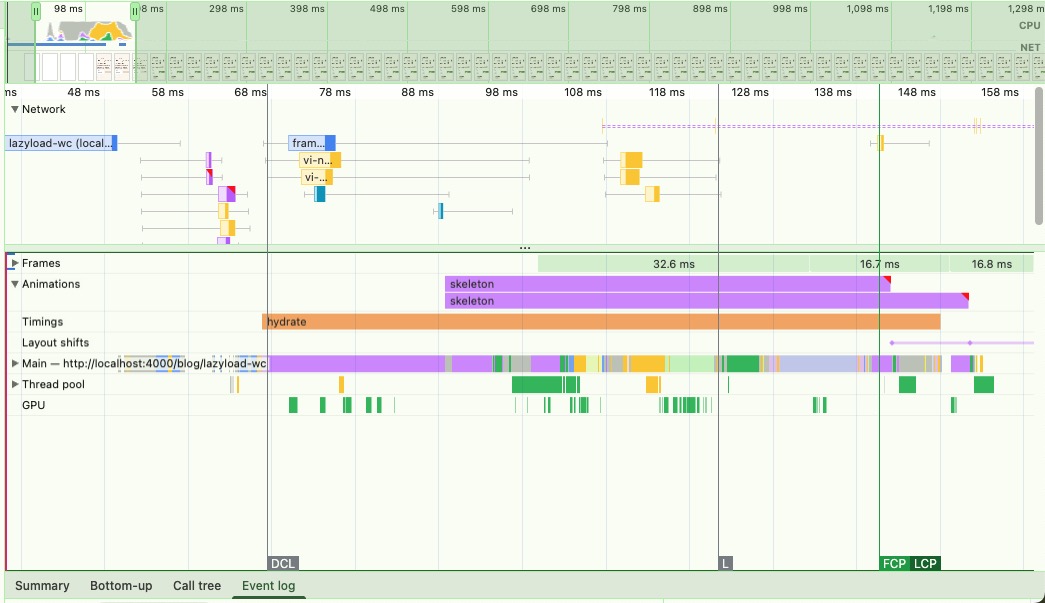
Figure: The small manifest is loaded on every page; individual component bundles are fetched only on demand.
The loader’s behavior is predictable and fast! Initial hydration typically finishes within 70ms of the DOMContentLoaded event. Component downloads happen in parallel and are usually completed within ~150ms, which is when the final layout shift occurs.
Improving the First Paint
Because components are loaded on demand, there’s a small window of time between the browser seeing the tag and the component actually rendering. We can avoid “invisible” or “broken” looking elements by styling them with the :not(:defined) selector.
This is also where ce-autoloader really shines—it provides built-in mechanisms to handle these transitions beautifully with CSS animations!
:not(:defined) {
  display: block;
  border-radius: var(--radius-md);
  padding: 1em;
  min-width: 3em;
  background-color: var(--color-accent);
  color: var(--color-accent-content);
  cursor: wait;
}